Windows NT Systems Programming: Spring 2000
[ Home | Syllabus | Course Notes | Assignments | Search]
VB Automation (chapter 25)
- IDispatch supports a kind of a "interpreted" COM function call
- Invoke: can call any function through data driven information
- Variant: type self identifying "typeless" variable (p. 627)
- Uses data-driven scheme to invoke functions and pass parameters (by name or ID)
- This information is stored in a type library. located through the
registry.
- Access can go either way
- VB uses C++ Com object
- C++ uses VB "Com" object
VB calls C++ Component (EX25a)
Here are the "worker" functions for a simple bank object
with data member "double m_dBalance"
double CBank::Withdrawal(double dAmount)
{
    if (dAmount < 0.0) {
      return 0.0;
    }
    if (dAmount <= m_dBalance) {
      m_dBalance -= dAmount;
      return dAmount;
    }
    double dTemp = m_dBalance;
    m_dBalance = 0.0;
    return dTemp;
}

void CBank::Deposit(double dAmount)
{
    if (dAmount < 0.0) {
      return;
    }
    m_dBalance += dAmount;
}

double CBank::GetBalance()
{
    return m_dBalance;
}

void CBank::SetBalance(double newValue)
// we need to provide for automation interface since it is expected (see below)
{
    TRACE("Sorry, Dave, I can't do that!\n");
}
Use MFC Macros to set up Dispatch Map:
BEGIN_DISPATCH_MAP(CBank, CCmdTarget)
//{{AFX_DISPATCH_MAP(CBank)
DISP_PROPERTY_EX(CBank, "Balance", GetBalance, SetBalance, VT_R8)  DISP_FUNCTION(CBank, "Withdrawal", Withdrawal , VT_R8, VTS_R8)
DISP_FUNCTION(CBank, "Deposit", Deposit, VT_EMPTY, VTS_R8)
//}}AFX_DISPATCH_MAP
END_DISPATCH_MAP()
DISP_FUNCTION(CBank, "Withdrawal", Withdrawal , VT_R8, VTS_R8)
DISP_FUNCTION(CBank, "Deposit", Deposit, VT_EMPTY, VTS_R8)
//}}AFX_DISPATCH_MAP
END_DISPATCH_MAP()
- Access to data members (properties) is through Get/Set functions
VT_R8 - is variant real double (8 bytes) number (Visual Basic is untyped and uses
variants extensively)
- Function name as string and then as function (pointer)
- Withdrawal returns double, has one parameter which is a double
- Deposit returns "void" (VT_EMPTY) and takes one double parameter)
Interface/Creation
BEGIN_INTERFACE_MAP(CBank, CCmdTarget)
	INTERFACE_PART(CBank, IID_IBank, Dispatch)
END_INTERFACE_MAP()

// {632B1E4C-F287-11CE-B5E3-00AA005B1574} // uuid - used below
IMPLEMENT_OLECREATE2(CBank, "ex25a.Bank", 0x632b1e4c, 0xf287, 0x11ce,
	0xb5, 0xe3, 0x0, 0xaa, 0x0, 0x5b, 0x15, 0x74)
- CCmdTarget provides support for COM
- Object CBank with ID IID_IBank has interface called Dispatch
- Create object, UUID is divided into many arguments because of its size.
Object Definition Language File (ODL)
Extension to IDL file
// ex25a.odl : type library source for ex25a.exe

// This file will be processed by the MIDL compiler to produce the
// type library (ex25a.tlb).

[ uuid(A9515AA2-5B85-11D0-848F-00400526305B), version(1.0) ]
library Ex25a
{
	importlib("stdole32.tlb");


	//  Primary dispatch interface for CBank

	[ uuid(A9515AB6-5B85-11D0-848F-00400526305B) ]
	dispinterface IBank
	{
		properties:
			// NOTE - ClassWizard will maintain property information here.
			//    Use extreme caution when editing this section.
			//{{AFX_ODL_PROP(CBank)
			[id(1)] double Balance;
			//}}AFX_ODL_PROP

		methods:
			// NOTE - ClassWizard will maintain method information here.
			//    Use extreme caution when editing this section.
			//{{AFX_ODL_METHOD(CBank)
			[id(2)] double Withdrawal(double dAount);
			[id(3)] void Deposit(double dAmount);
			//}}AFX_ODL_METHOD

	};

	//  Class information for CBank

	[ uuid(632B1E4C-F287-11CE-B5E3-00AA005B1574) ]
	coclass Bank
	{
		[default] dispinterface IBank;
	};

	//{{AFX_APPEND_ODL}}
};

- Defines library which uses automation library (see next line)
- ID is how program refers to this functions (index in array of function pointers:
v-table)
Visual Basic Accessing Code
Dim Bank As Object
Sub LoadBank()
    Set Bank = CreateObject("Ex25a.Bank")
End Sub

Sub UnloadBank()
    Set Bank = Nothing
End Sub

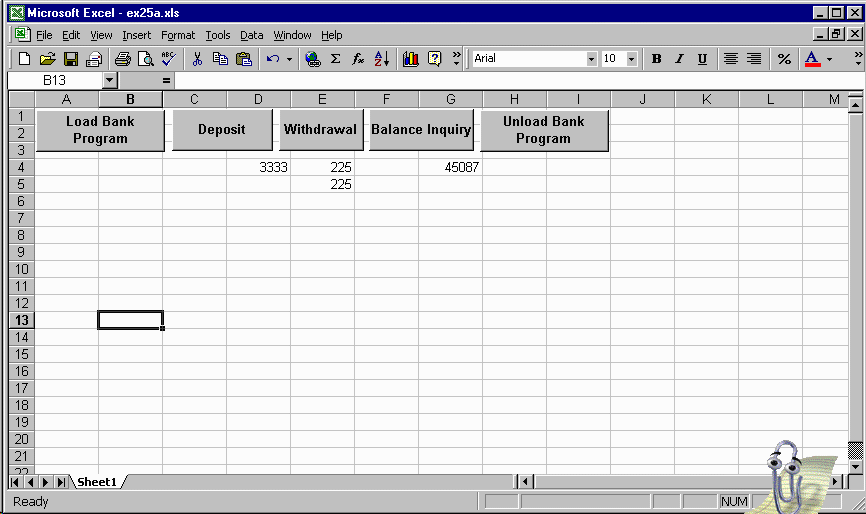
Sub DoDeposit()
    Range("D4").Select
    Bank.Deposit (ActiveCell.Value)
End Sub
Sub DoInquiry()
    Dim amt
    amt = Bank.Balance()
    Range("G4").Select
    ActiveCell.Value = amt
End Sub

Sub DoWithdrawal()
    Range("E4").Select
    Dim amt
    amt = Bank.Withdrawal(ActiveCell.Value)
    Range("E5").Select
    ActiveCell.Value = amt
End Sub
- Declares an Object (COM)
- Finds DLL in registry under "ex25a.Bank", loads it and calls classfactory
to create an instance
(pretty easy in VB)
- Selects cell "D4", makes it the "ActiveCell"
- Calls COM function "Deposit" with argument the value of cell
"D4"
- Calls COM funciton "Balance" which returns new balance, and places in
cell "G4"
- Call Com function "Withdrawal", this make withdraw less if balance woudl
have gone negative, so update actual amount withdrawn
Linking VB "macros" to buttons on spread sheet
Copyright chris wild 1999/2000.
For problems or questions regarding this web contact [Dr.
Wild].
Last updated: March 23, 2000.