Windows NT Systems Programming: Spring 2000
[ Home | Syllabus | Course Notes | Assignments | Search]
Comparing Three Simple Programs
So far we have seen three simple programs which
basically write some text to the screen:
- WIN32 "C" program
- Hand built MFC "C++" program
- Wizard built document/view MFC "C++" program
They differ in the way the write to
the screen and the way they route messages to the code that writes to the screen.
Let's look at "painting the screen" first
WIN32 "C" Program
	hdc = BeginPaint (hwnd, &ps) ;
	 // get device context associated with window receiving message
	GetClientRect (hwnd, &rect) ;
	DrawText (hdc, "Hello, Windows 95!", -1, &rect,
	             DT_SINGLELINE | DT_CENTER | DT_VCENTER) ;
	EndPaint (hwnd, &ps) ;
	// return device context
Hand built MFC program
void CMainWindow::OnPaint ( )
{
CPaintDC dc (this); // get a device context for "this" window  CRect rect;
GetClientRect (&rect); // find out how big the window is
// compare to above for difference between functional and object mechanisms.
dc.DrawText ("Hello, MFC", // Draw this Text
-1, // which is terminated by the null character
&rect, // in this rectangle
DT_SINGLELINE | DT_CENTER | DT_VCENTER); // on a single line in the center
} // device context returned in destructor for "dc"
CRect rect;
GetClientRect (&rect); // find out how big the window is
// compare to above for difference between functional and object mechanisms.
dc.DrawText ("Hello, MFC", // Draw this Text
-1, // which is terminated by the null character
&rect, // in this rectangle
DT_SINGLELINE | DT_CENTER | DT_VCENTER); // on a single line in the center
} // device context returned in destructor for "dc"
Document/View
void CEx03aView::OnDraw(CDC* pDC)
// device context passed in to View object
{
	CRect rect;
	GetClientRect(&rect);
	pDC->DrawText("Just Do It", &rect,
	 DT_SINGLELINE | DT_CENTER | DT_VCENTER);
}
- View is a child window of main window and is given the responsibility of drawing
the view
- Main window is responsible for status, toolbar, menus, etc
- WHY separate responsibilties - good engineering practice PLUS can have multiple
views in one main window.
- Can imagine that main frame intercepts WM_PAINT message and issues a WM_DRAW
message directed to the View object.
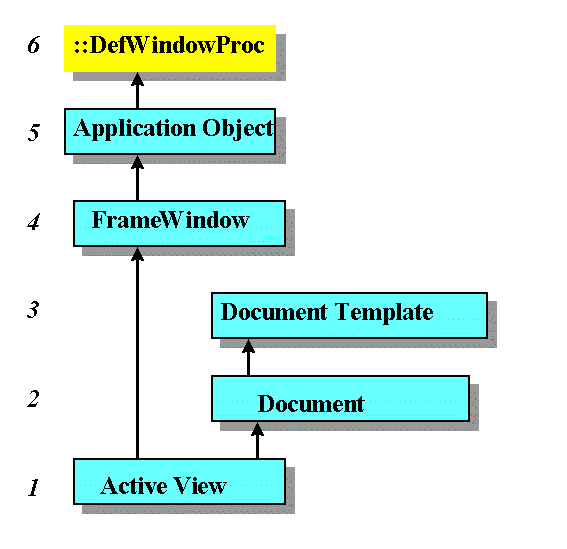
Routing the Message
Demo: Randomly Color Ellipse
DESCRIPTION
- Similar to Exercise EX04A in book.
- Displays two concentric circles - creating a doughnut like object.
- The center of this doughnut is black.
- The color of the rest of the doughnut is randomly chosen whenever mouse movement is
detected in the doughnut.
OBJECTIVES
- Use another message type/handler (OnMouseMove)
- Use a random number generator
- Use a "COLORREF" object to initialize a colored brush
CREATING THE DEMO
- Use AppWizard to create SDI project named randColor (without ActiveX and print
capabilities)
- Add m_color (of type COLORREF -see page 82) and m_circle and m_center (of type
CRect) data members to CRandColorView (this will go into CRandColorView.h)
- Use ClassWizard to add a message handler for Mouse Move for CRandColorView (see
description page 58 of the book as an example).
- Replace the code there with the following
void CRandColorView::OnMouseMove(UINT nFlags, CPoint point)
{
	if (m_circle.PtInRect(point)) {// if inside circle
		if(!m_center.PtInRect(point)) { // but not center
			m_color = RGB(rand()%256,rand()%256,rand()%256);
			// randomly choose a 24 bit color value
			InvalidateRect(m_circle); // force a redraw
		}
	}
}
- Change the OnDraw function to the following
void CRandColorView::OnDraw(CDC* pDC)
{
	CBrush myBrush(m_color); // pick a colored brush

	pDC->SelectObject(myBrush);
	pDC->Ellipse(m_circle); // draw colored circle
	pDC->SelectStockObject(BLACK_BRUSH);
	pDC->Ellipse(m_center); // draw black center
}
- Initialize three new data members inside the constructor
CRandColorView::CRandColorView(): m_circle(0,0,200,200),
	m_center(75,75,125,125)
	// use constructor initializer to call non-default constructors of CRect
{
	m_color = RGB(0,255,0); // start with green - see table page 83
	srand(NULL); // initialize random number sequence
}
Full source code here.
Dragging an object/GDI: Ex5c
Example ex5c demostrates several interesting features of windows
program.
- Capturing the mouse for an application
Used to drag an object around the screen
- Mouse button down - capture
- Mouse Move: move object with mousee
- Mouse Button Up - release object
- Scrolling
- Logical coordinates
- GDI objects (more about)
First look at three message handlers for the mouse - which work together.
(NOTE: the hand points to places where footnotes provide
explanations)

void CEx05cView::OnLButtonDown(UINT nFlags, CPoint point)
{
    CRect rectEllipse(m_pointTopLeft, m_sizeEllipse); // still logical
    CRgn  circle;

    CClientDC dc(this);
    OnPrepareDC(&dc);
    dc.LPtoDP(rectEllipse); // Now it's in device coordinates
    circle.CreateEllipticRgnIndirect(rectEllipse);
    if (circle.PtInRegion(point)) {
        // Capturing the mouse ensures subsequent LButtonUp message
        SetCapture();
        m_bCaptured = TRUE;
        CPoint pointTopLeft(m_pointTopLeft);
        dc.LPtoDP(&pointTopLeft);
        m_sizeOffset = point - pointTopLeft; // device coordinates
        // New mouse cursor is active while mouse is captured
        ::SetCursor(::LoadCursor(NULL, IDC_CROSS));
    }
}
- CRect can be initialized several ways, , 4 integers, another CRect object, Point and
Size, 2 Points - see constructor info
- CRgn - for shapes other than rectangles (compare previous example reacting to points in
corner of rectangle
- OnPrepareDC, sets for logical coordinates: deals with scrolling (see below)
- convert logical points to device points (that's why we made a copy)
- Allows mouse move message to come to this window even if mouse if moved outside this
window
- convert to device coordinates
- calcualte offset from mouse to circle's topleft
- call win32 function to load different cursor
void CEx05cView::OnLButtonUp(UINT nFlags, CPoint point)
{
    if (m_bCaptured) {
        ::ReleaseCapture();
	// release capture so mouse can go to another application
        m_bCaptured = FALSE;
    }
}

void CEx05cView::OnMouseMove(UINT nFlags, CPoint point)
{
    if (m_bCaptured) {
        CClientDC dc(this);
        OnPrepareDC(&dc);
        CRect rectOld(m_pointTopLeft, m_sizeEllipse);
        dc.LPtoDP(rectOld);
        InvalidateRect(rectOld, TRUE);
        m_pointTopLeft = point - m_sizeOffset;
        dc.DPtoLP(&m_pointTopLeft);
        CRect rectNew(m_pointTopLeft, m_sizeEllipse);
        dc.LPtoDP(rectNew);
        InvalidateRect(rectNew, TRUE);
    }
}
- Invalidate to redraw just the old and new changed places on the window
- Try removing the first one
- identify the area to be redrawn
Also need to see drawing function
void CEx05cView::OnDraw(CDC* pDC)
{
    pDC->SelectStockObject(BLACK_BRUSH); // Deselect brushHatch
    pDC->Rectangle(CRect(100, -100, 200, -200)); // Test invalid rect
    CBrush brushHatch(HS_DIAGCROSS, RGB(255, 0, 0));
    CPoint point(0, 0);                  // logical (0, 0)

    pDC->LPtoDP(&point);                 // In device coordinates,
    pDC->SetBrushOrg(point);          //  align the brush with
                                         //  the window origin
    pDC->SelectObject(&brushHatch);
    pDC->Ellipse(CRect(m_pointTopLeft, m_sizeEllipse));

}
- to demostrate redrawing works (take out first invalidate rectangle above to see
this)
- Creates a fancy brush with red cross hatching
- Makes sure that the cross hatching lines up consistently all the time
Take it out to see the difference.
Use these programs to experiment and test your ideas about windows programming
Comment out function calls
Change the parameters
Full source code here.
Copyright chris wild 1999/2000.
For problems or questions regarding this web contact [Dr.
Wild].
Last updated: January 18, 2000.