[ Home | Syllabus |Course Notes]
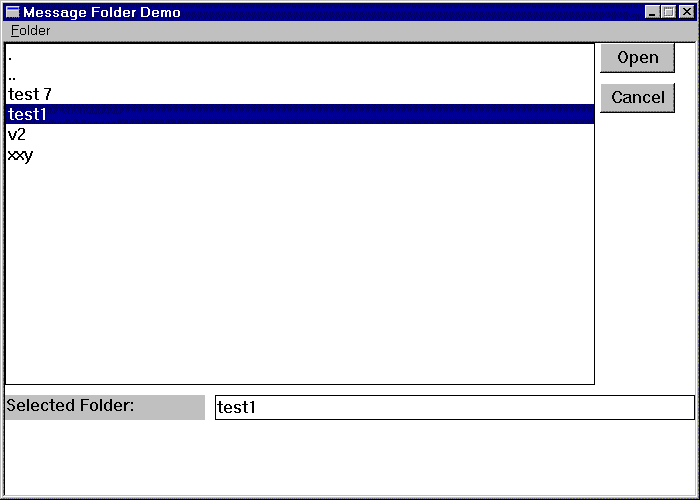
Problem: How to identify which message folder to open?
Solution: Build a Dialog Window which displays available folders in a CListBox control


 CListBox
Object which displays a list of items which can be selected by the user.
Example for Message Folders:
void CMainWindow::OnOpen()
{
	HANDLE folder;
	WIN32_FIND_DATA findData;

	CRect rect;
	GetClientRect(&rect);
	makeOpenFolderDialog(rect, this);

	folder = FindFirstFile("*", &findData);
	while( folder != INVALID_HANDLE_VALUE) {
		if(findData.dwFileAttributes & FILE_ATTRIBUTE_DIRECTORY) {
			// assume all directories are folders
			m_lBoxFolders.AddString(findData.cFileName);
		}
		if(!FindNextFile(folder, &findData))
			break;
	}
	FindClose(folder);
}
Catching Selections from the listBox1) Define a message handling member function for CMainWindow (or appropriate container window)
2) Add a MESSAGE_MAP entry for listBox Selection messages

ON_LBN_SELCHANGE(IDC_LISTBOX,OnFolderSelection)
3) Write the Message Handler
void CMainWindow::OnFolderSelection()
{
	CString selection;
	int nIndex = m_lBoxFolders.GetCurSel();
	if (nIndex != LB_ERR) {
		m_lBoxFolders.GetText(nIndex,selection);
		m_editSelection.SetWindowText(selection);
	}
}
Doubly Clicking Entries From ListBoxDouble Click events are handled as another message type.
1) Define a message handling member function for CMainWindow (or appropriate container window)
2) Add a MESSAGE_MAP entry for listBox DBLCLK messages
ON_LBN_DBLCLK(IDC_LISTBOX,OnFolderDblClk)
3) Write the Message Handler
void CMainWindow::OnFolderDblClk()
{
	CString selection;

	int nIndex = m_lBoxFolders.GetCurSel();
	if (nIndex != LB_ERR) {
		m_lBoxFolders.GetText(nIndex,selection);
		m_editSelection.SetWindowText(selection);
		OnOpenFolder();
	}
}
void CMainWindow::OnOpenFolder()
{
	CString message;
	CString folder;

	m_editSelection.GetWindowText(folder);
	message = "Ok to open " + folder + "?"; // Cstring has nice concatenation operations
	int result = MessageBox(message,"Open",MB_YESNOCANCEL);
	if(result == IDYES) {
		MessageBox("need code to open here","open");
		cleanUpOpenFolder();
	}
	else if(result == IDNO) {
		MessageBox("no folder opened","no open");
		cleanUpOpenFolder();
	}
	else if(result == IDCANCEL) {

	}
}
void CMainWindow::cleanUpOpenFolder() // Here is how to get rid of open folder dialog window
{
	m_lBoxFolders.DestroyWindow();	// Destroys Window but not the object
	m_labelSelection.DestroyWindow();
	m_btnCancelFolder.DestroyWindow();
	m_btnOpenFolder.DestroyWindow();
	m_editSelection.DestroyWindow();
}
Summary on CListBox